How to adjust the team-name?
Updated on 15 Apr 2026
Required: Administrator role
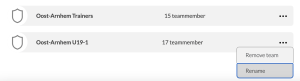
Log in and click “Teams” in the menu.
There you’ll see a list of all your club’s teams.
Click the three dots next to a Team name to see the options:
Delete and Rename.
Using Rename, you can change your team’s name.
Be careful not to give a Team the same name as another existing Team (this is technically possible, but not recommended).
Image