The playlist feature in TeamTV just got even smarter
The playlist feature in TeamTV just got even smarter.
No more switching between tabs. We've seamlessly merged playlists and comments into a single overview. Feedback moves with the clips, so you always see the right context — exactly when it matters.
And for coaches: we've added something that will make your day. Use playlists to guide players individually? Now you can reverse them. New clips appear at the top — so your most important feedback gets seen first.
Less searching. Faster insights. More effective coaching. This is TeamTV: your powerful partner in growth.
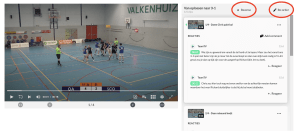
See the red circles. With "Reverse/Omdraaien", your latest clips stay at the top. The setting is saved, so you’ll always see your most up-to-date feedback first.
Use the "Re-order" button to enter edit mode and fully customize your list.
- Move clips to a different position.
- Adjust clip length with a single click.
- Update descriptions anytime.
- Give every clip a clear, recognizable title.
Playlists are now the ultimate coaching tool — ideal for match reviews, tracking opponents, or delivering personal feedback.
And the best part? You can keep building them over multiple games, seasons, or development phases.
If you only tag during a game using team tags or the 'record button', those moments quickly disappear from view. Within a week, they’re forgotten.
So go all in on playlists — and make every clip count.